
How to Launch a Professional Business Website Without Starting From Scratch
November 5, 2026 | by Team Pixeliio

A professional website can help your business build credibility, explain its services, reach potential customers, and create new opportunities.
However, building a website from the ground up can feel overwhelming, especially if you don’t have a design or development background.
The good news is that you don’t always need to start from a blank page. Modern website builders and professionally designed templates make it possible to create a business website using an existing design foundation.
In this guide, we’ll walk through the steps to launch a professional business website without starting from scratch.
1. Define the Purpose of Your Website
Before choosing a template or website platform, decide what you want your website to achieve.
For example, your website might need to:
- Introduce your business.
- Present your products or services.
- Generate leads and inquiries.
- Allow customers to book appointments.
- Display your portfolio or previous work.
- Sell products online.
Having a clear goal will help you choose the right platform, design, and website structure.
2. Choose the Right Website Platform
Your website platform determines how you build, customize, manage, and publish your website.
Some popular options include:
Framer
Framer is useful for visually focused websites, landing pages, portfolios, and startup websites.
Webflow
Webflow offers detailed visual design controls and content management capabilities. It can be suitable for business websites that require flexible layouts and structured content.
Wix Studio
Wix Studio provides visual design and responsive layout tools for businesses, freelancers, and agencies.
Shopify
If your primary goal is to sell products online, Shopify provides ecommerce-focused tools for managing products, collections, orders, and online store experiences.
Choose a platform based on what your business needs rather than simply following popularity.
3. Find a Website Template That Fits Your Business
Once you’ve selected a platform, look for a template that matches your business and website goals.
For example:
- A consulting business may need service pages and inquiry forms.
- A restaurant may need menus, location information, and reservation options.
- A creative agency may need portfolio galleries and project showcases.
- An online store may need product pages, collections, and shopping features.
A good template should provide a useful starting structure without forcing you to change your entire business around its design.
4. Prepare Your Website Content
Content is one of the most important parts of a business website.
Before customizing the template, prepare the information you want visitors to see.
Most business websites need the following pages:
Homepage
Introduce your business, explain what you offer, and guide visitors toward important actions.
About Page
Share your business background, values, experience, or mission.
Services or Products Page
Explain what you offer and how customers can benefit from it.
Contact Page
Provide the information visitors need to get in touch, such as an email address, phone number, location, or contact form.
FAQ Page
Answer common customer questions to make it easier for visitors to understand your business.
You may need additional pages depending on your industry and website goals.
5. Customize the Template With Your Branding
Now it’s time to make the template feel like your business.
Replace the demo logo, text, images, and other sample content with your own.
Pay attention to:
- Brand colors.
- Typography.
- Logo placement.
- Image quality.
- Button labels.
- Page layouts.
- Navigation structure.
Try to maintain visual consistency throughout the website. Avoid adding unnecessary sections or decorative elements that make the experience confusing.
6. Make Sure Your Website Works on Mobile
Many visitors will access your website from smartphones and tablets.
Review every important page on different screen sizes. Check that navigation works, text is readable, buttons are easy to tap, and images fit properly.
A website that looks good on a desktop but is difficult to use on mobile can create a poor first impression.
7. Set Up Your Domain
Your domain is your website’s address.
Choose a domain that is easy to remember and closely connected to your business name or brand.
Once you have registered it, follow your website platform’s instructions to connect the domain.
You should also configure any required DNS records and confirm that your website loads correctly using the domain.
8. Take Care of Basic SEO
Search engine optimization helps search engines understand your website and its content.
Before publishing, take care of these basics:
- Give every important page a clear title.
- Write unique meta descriptions.
- Use descriptive URLs.
- Organize content with proper headings.
- Add relevant image alt text.
- Create useful internal links.
- Make sure important pages can be indexed.
- Include relevant business information.
SEO takes time and ongoing effort. Publishing a website does not guarantee immediate search visibility.
9. Test Everything Before Publishing
Before launching, review your website carefully.
Check:
- All navigation links.
- Contact forms.
- Buttons and calls to action.
- Images and videos.
- Mobile layouts.
- Page loading performance.
- Spelling and grammar.
- Domain and SSL configuration.
- Important legal and policy pages where applicable.
If your website collects personal information or processes payments, make sure the relevant privacy, security, and compliance requirements are addressed.
10. Publish and Keep Improving
Once everything is ready, publish your website.
But launching is only the beginning. Review visitor behavior, collect feedback, update your content, and improve areas that aren’t performing well.
A business website should evolve as your business grows.
Final Thoughts
Launching a professional business website doesn’t always require a fully custom design or a complicated development process.
With the right platform, a suitable website template, and well-prepared content, you can create a website that represents your business and supports your goals.
Start with a clear plan, choose a template that fits your requirements, and focus on providing visitors with a useful experience.

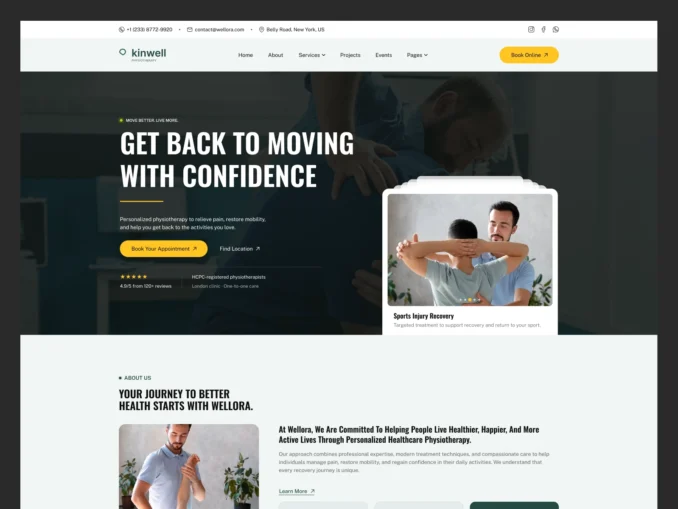
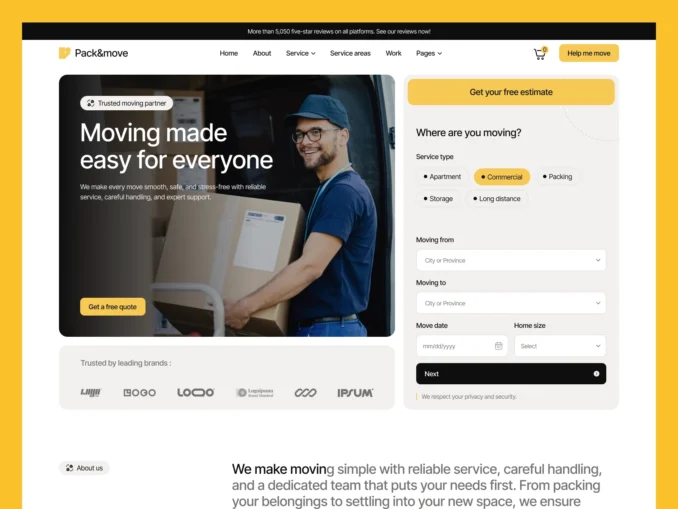
Our Featured Templates
Templates Designed to Help Your Business Stand Out
From online stores to service businesses, our templates provide a strong foundation with modern design, intuitive user experience, and flexible customization options.


Easy Setup & Dedicated Support
Easy Documentation When You Need It,
Expert Help When You Don't
Every template includes clear, step by step documentation to help you get your website up and running quickly. If you’d rather focus on your business instead of setup and customization, our team can help you get everything ready for launch.
Customer Success Stories
Trusted by Businesses Around the World

Mia Thompson
“The attention to detail throughout the template is impressive. Everything works seamlessly and the overall user experience is excellent.”

Mia Thompson
“As a small business owner, I needed something professional and affordable. This template delivered both while remaining easy to customize.”

Mia Thompson
“Our previous website looked outdated. This template completely transformed our online presence and gave our brand a fresh appearance.”

Mia Thompson
“The combination of great design and practical functionality made this template an easy choice. It helped us launch with confidence.”

Mia Thompson
“Everything felt carefully planned and professionally executed. We were able to focus on our business while the template handled the rest.”

Mia Thompson
“Finding a high quality template isn’t easy, but this one stood out immediately. It saved us time and delivered excellent results.”