
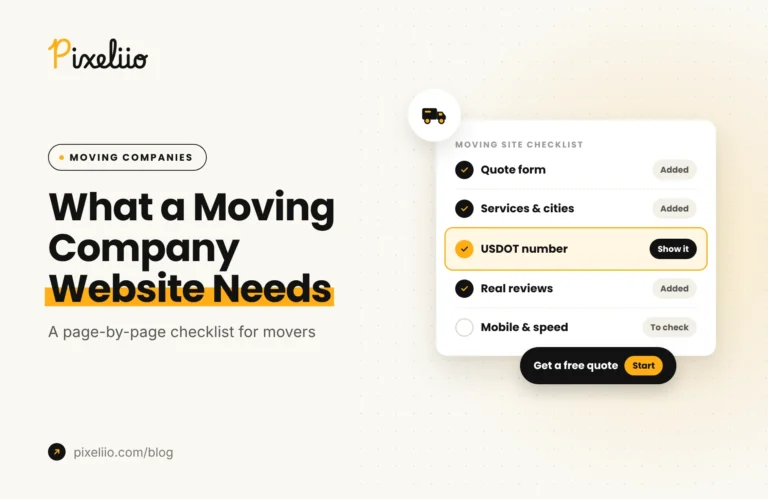
What a Moving Company Website Needs: A Page-by-Page Checklist
November 26, 2026 | by Team Pixeliio
Most people who hire a mover do it on a deadline. They search, open a few moving company websites, and request quotes from the ones that look trustworthy and make it easy. Your website has to pass that quick test.
This checklist walks through a moving company website page by page: what each page should include and why it matters. Use it to check your current site, or as a plan before you build a new one.
1. Home Page
Your home page has a few seconds to answer three questions: what you do, where you do it, and how to get a quote.
- A clear headline, such as “Local and long-distance movers in Albuquerque”.
- A “Get a free quote” button at the top, repeated further down the page.
- Your main services, each linking to its own page.
- A few real reviews and a photo of your own crew or trucks.
- Your phone number in the header, tap-to-call on a phone.
2. Quote Request Page
The quote form is where a visitor becomes a lead, so it deserves the most care. A short multi-step form feels easier than one long one. Ask for:
- Type of move: local, long-distance, office or packing only.
- Pickup and destination ZIP codes.
- Move date, or a date range.
- Home size, for example studio, 2 bedrooms or 4+ bedrooms.
- Name, phone number and email.
Say what happens next, for example “We reply within one business day with your estimate”, and only promise a time you can keep. Test the form on a phone and make sure every request reaches your inbox.
3. Service Pages
Give each service its own page: local moving, long-distance moving, packing and unpacking, storage, commercial moving, and specialty items such as pianos or safes. Each page should say what is included, who it is for and how to book. Separate pages also help you show up when people search for that exact service.
4. Service Area and City Pages
People search for “movers near me” or “movers in” their town. List every area you cover, and give your main cities a page each. Make each one genuinely local: neighborhoods you serve, typical moves there, local reviews. Copying the same text with a new city name helps neither customers nor search engines.
5. Pricing Page
Customers want an idea of cost before they call. If you can, show starting prices or hourly rates by crew size. If every move is quoted, explain what affects the price: distance, home size, stairs, packing, storage and the time of year. Mention deposits and how you handle extra charges, so nothing surprises them on moving day.
6. About and Team Page
People are trusting you with everything they own. Show who you are: how long you have been moving people, real photos of your team and trucks, and what you do to protect customers’ belongings. Real photos build more trust than stock images.
7. Reviews
Show real reviews with first names and the type of move, and link to your Google Business Profile or other review sites so visitors can check them. Never write or buy reviews. Customers notice, and the FTC’s rule on fake reviews lets the agency seek civil penalties against businesses that knowingly use them.
8. FAQ Page
Answer what customers ask most: How far ahead should I book? Do you supply boxes? Is my move insured? What can’t you move? How does the deposit work? What happens if my move date changes? A good FAQ saves you phone time and reassures people who are still comparing movers.
9. Licensing and Consumer Information
If you move households across state lines, show your USDOT number in the footer or on your About page. FMCSA tells consumers to avoid movers that do not show a USDOT number in their ads.
Interstate movers with a website must also display prominently a link to FMCSA’s “Ready to Move?” document, or an accurate copy of it. State-licensed local movers may have their own state rules. Check what applies to your business with FMCSA and your state; this is not legal advice.
10. Contact Page
Give your phone number, email, business hours and address, with a map if customers visit your office or storage facility. Add a short contact form for questions that are not quote requests.
Across Every Page: Mobile, Speed and Local SEO
- Mobile. Many customers will find you on a phone. Text should be easy to read, buttons easy to tap, and the quote form comfortable to fill in with a thumb.
- Speed. Compress large photos and avoid heavy sliders or auto-playing video. Google’s free PageSpeed Insights shows what slows a page down.
- Local SEO. Keep your business name, address and phone number the same on your website, Google Business Profile and directories. Give every page a clear title, such as “Long-Distance Movers in Albuquerque | Your Company”.
- Measurement. Connect Google Search Console and an analytics tool so you can see which searches bring visitors and how many request a quote.
Moving Company Website Checklist
- Home page with a clear headline, quote button and phone number.
- A short, mobile-friendly quote form that you have tested.
- A page for each service.
- Your service areas, with a local page for each main city.
- Prices or an honest explanation of how you price a move.
- An About page with your real team and trucks.
- Real reviews, linked to where customers can check them.
- An FAQ on booking, deposits, insurance and moving day.
- Your USDOT number and the “Ready to Move?” link if you move interstate.
- A contact page with hours and address.
- Fast pages, consistent business details and Search Console connected.
Start With These Pages Already Built
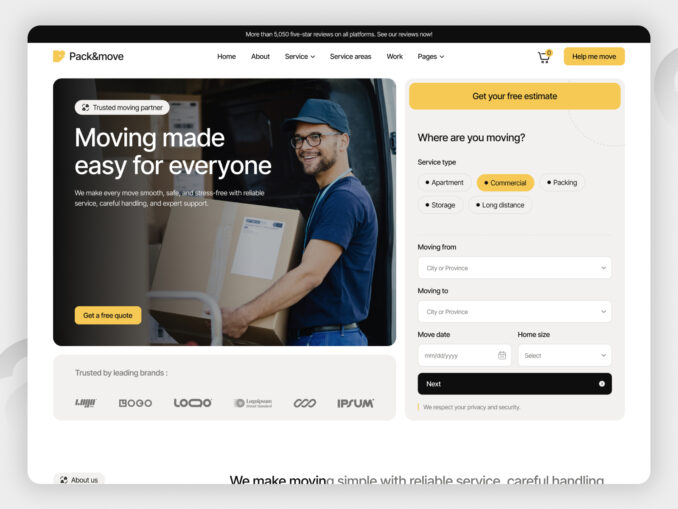
Building all of this from scratch takes time and money; our guide to what a moving company website costs breaks down the options. A template made for movers already includes most of these pages. Pack & Move, our moving company template for Framer, comes with a multi-step estimate form, service and city pages, pricing, team, FAQ, blog and contact pages, so you only add your own details.
Prefer to hand it off? See how we build websites for moving companies. Our Template Setup & Customizations service starts at $500: we set up the template on your account, add your content, services, cities and branding on every existing page, and get your site live. Our first few setup clients get a founding price of $250 in return for a short case study and an honest review. The template license is bought separately on its marketplace.




Our Featured Templates
Templates Designed to Help Your Business Stand Out
From online stores to service businesses, our templates provide a strong foundation with modern design, intuitive user experience, and flexible customization options.

Easy Setup & Dedicated Support
Easy Documentation When You Need It,
Expert Help When You Don't
Every template includes clear, step by step documentation to help you get your website up and running quickly. If you’d rather focus on your business instead of setup and customization, our team can help you get everything ready for launch.
Customer Success Stories
Trusted by Businesses Around the World

Anisur Rahaman
“We launched faster than planned and received positive feedback immediately. The template feels premium and helped us establish credibility online.”

Wilbert Lacy
“The attention to detail throughout the template is impressive. Everything works seamlessly and the overall user experience is excellent.”

Viraj Makol
“As a small business owner, I needed something professional and affordable. This template delivered both while remaining easy to customize.”

Jeffrey Norris
“Our previous website looked outdated. This template completely transformed our online presence and gave our brand a fresh appearance.”

Thauhidul Tanjimoon
“The combination of great design and practical functionality made this template an easy choice. It helped us launch with confidence.”

Victor Lee
“Everything felt carefully planned and professionally executed. We were able to focus on our business while the template handled the rest.”